In today’s busy world, clear communication is very important. Presentation apps are now a key part of business, education, and personal growth. Traditional apps like PowerPoint and Google Slides have been popular for years. However, they often require a lot of manual work and leave little room for new ideas. This is where AI-powered presentation apps like Tome app come in.
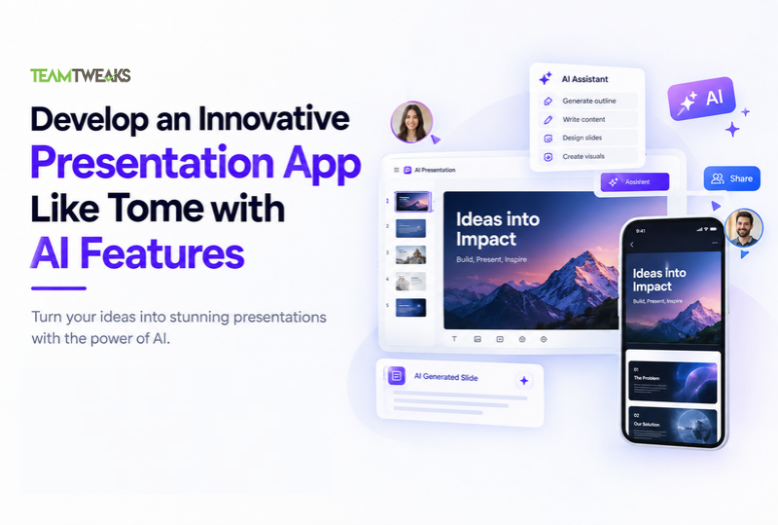
Tome is changing how we make presentations. By using artificial intelligence (AI), Tome helps users create dynamic and engaging presentations with ease. In this guide, we’ll look at why AI is needed in presentation apps, the key features an AI-powered app like Tome should have, the technologies required, and how to develop an app and make money from such an app.
What is the Tome App?

Tome is an AI-powered app that helps you create presentations quickly and easily. It is different from apps like PowerPoint because it uses artificial intelligence to make the process faster and smarter.
Here are some features of Tome:
- AI Helps with Content: Tome can generate text for your slides based on what you type or ask. It can help create bullet points, summaries, or even full paragraphs for your presentation.
- Smart Design Suggestions: The app automatically chooses the best design for your presentation. It picks colors, fonts, and layouts that look good with your content, so you don’t have to worry about design.
- Team Collaboration: You can work on presentations with other people in real time. It’s easy to share and edit slides together.
- Multimedia: Tome lets you add images, videos, and animations to your slides to make your presentation more interesting.
- Easy to Use: The app is simple and easy to use, even if you don’t have experience with making presentations.
Tome’s main goal is to make creating presentations faster and simpler by using AI to help with writing and design, so you can focus on the ideas you want to share.
Understanding the Market and the Need for an AI-Powered Presentation App like Tome App
Current Landscape of Presentation Apps like Tome App
Popular presentation apps like Microsoft PowerPoint, Google Slides, and Apple Keynote are widely used to create professional slideshows. These tools offer basic features such as slide templates, transitions, and the ability to add images and videos. However, creating a presentation still requires a lot of manual work. Users have to design slides, write content, and ensure the presentation looks good, which can be time-consuming and challenging, especially for those who aren’t confident in their design skills.
As technology advances, businesses and schools are looking for smarter tools that can do more than just provide templates. They want apps that can understand the content, offer helpful suggestions, automate tasks, and save users time.
Benefits of AI in Presentation Apps
AI (Artificial Intelligence) can solve many of the problems people face with traditional presentation tools. By automating parts of the process, AI can make creating presentations faster and easier. Here’s how AI can improve presentation apps.
- Content Generation: AI can help by generating text, suggesting bullet points, or summarizing long paragraphs into shorter, easy to read points for slides.
- Design Automation: AI can choose the best design, layout, colors, and fonts based on the content, making slides look professional without much effort from the user.
- Image and Video Recommendations: AI can suggest images, charts, and videos that match the content, helping to make the presentation more engaging and visually appealing.
- Speech-to-Text: AI-powered voice recognition can allow users to speak their content, which the app will convert into text on the slides, speeding up the process.
- Smart Assistance: AI can analyze what the user is creating and give real time feedback on how to improve the slides for better clarity and impact.
By integrating AI, presentation apps can help users create better presentations in less time, making the whole process simpler and more efficient.
Key Features of an AI-Powered Presentation App Like Tome App

- AI-Powered Design Assistance
Designing a presentation can be a lengthy process that demands creativity, which not everyone has. AI can simplify this by automatically adjusting slide layouts, fonts, colors, and themes to match the content. For instance, based on whether the content is professional, casual, or educational, AI can suggest appropriate themes and design elements. This feature is especially useful for users who want their presentations to look polished but don’t have strong design skills.
- Smart Content Generation
AI can make creating content much easier. Users can start with simple bullet points or a short paragraph, and the AI can expand on these ideas, offering more detailed content. It can also paraphrase or summarize long paragraphs to keep the slides concise and impactful. By identifying key themes or keywords, AI can suggest relevant content, helping users create engaging and cohesive presentations.
- Real-Time Collaboration and Feedback
Collaboration is essential in professional settings, and AI can enhance this experience by providing real-time feedback and suggestions as teams work on a presentation together. AI virtual assistants could give tips on improving the presentation’s flow, suggest data points, or recommend merging or deleting certain slides. Additionally, an AI-powered feedback system could review the presentation for grammar, tone, and clarity, helping users refine their work before finalizing it.
- Voice Assistance and Natural Language Processing (NLP)
Voice recognition is a powerful AI feature that lets users speak their ideas, with the AI converting speech into text to generate slides in real time. This can save a lot of time, especially for detailed presentations. NLP enables the AI to understand the context of the presentation, tailoring content generation to suit different purposes, whether it’s a sales pitch, academic lecture, or product demo.
- Customizable Templates Powered by AI
Traditional presentation apps offer templates, but AI can make these much more dynamic. By analyzing the content, the AI can suggest templates specifically suited to the type of presentation. For example, for a technical report, AI might recommend templates with graphs and charts, while for a marketing presentation, it could suggest templates with striking visuals and modern layouts.

How to Use a Tome App?
Using the Tome app is easy and quick, making it a great tool for creating presentations, documents, or web pages. Here’s a step-by-step guide on how to use Tome in simple terms.
Step 1: Log In and Create an Account
First, you need to create an account to use Tome. Go to the Tome website or app, and log in using your Google account. If you don’t have a Google account, you can create one. Once you’re logged in, you can start using Tome right away.
Step 2: Create Your Workspace
After logging in, the next step is to create a workspace. This workspace is where all your projects will be saved. You’ll be asked to choose a name for your workspace so that you can easily find it later. This name will help you organize your projects.
Step 3: Complete Your Profile
Once your workspace is set up, Tome will ask you a few simple questions about yourself. These questions are meant to help Tome understand how you plan to use the app. You might be asked why you’re using Tome and what you do for work. This information helps Tome give you better suggestions and improve your experience.
Step 4: Choose What to Create
Now, you can choose what kind of content you want to create. Tome gives you three options, Presentation, Document, or Web Page. Choose the option that fits what you need. For example, if you want to make a presentation, select “Presentation.” If you need to write a report or paper, choose Document. If you’re creating a webpage, select Web Page.
Step 5: Enter Your Topic and Subtopics
After choosing what to create, you’ll need to enter the main topic and any subtopics for your content. For example, if you’re making a presentation about a business idea, write the main topic and the details you want to include in your slides. Once you’ve typed your topic and subtopics, click “Continue” to move to the next step.
Step 6: Select a Color Theme
Next, Tome will show you different color themes for your content. These are ready-made styles that can make your presentation, document, or webpage look good. Pick the one that best suits your project. Once you choose a color theme, click Continue and Tome will create your content with the chosen colors.
Step 7: Review and Download
Once Tome finishes creating your content, take a look at it. If you want to change anything, like the text or colors, you can do that. When you’re happy with the result, you can download it or share it directly from the app.
Is Tome App AI Free or Paid?
Tome AI offers both free and premium services. The free version provides limited access to features. To unlock all features and functionalities, users can subscribe to paid plans, which include access to:
Free Plan
- Price: $0 per month
- Includes:
- Manual editing
- Browse templates
- Unlimited sharing
Premium plan
- Price: $20 per monthly or $192 per yearly
- Includes:
- AI generation & design tools
- Engagement Analytics
- Customized branding
- Build from 100+ templates
- Export to PDF
Core Technologies and Tools for Building an AI-Powered Presentation App like Tome App
Artificial Intelligence (AI) Technologies
At the core of an AI-powered presentation app are the AI technologies that make it smart and efficient. Here are the key AI technologies you’ll need:
- Machine Learning Algorithms: These help the app learn from user input and preferences. They suggest design elements, content, and layouts, improving their suggestions over time.
- Natural Language Processing (NLP): NLP helps the app understand and process text input. It can suggest content, paraphrase text, and summarize information based on user instructions.
- Computer Vision: This technology allows the app to process and understand images and videos. It can recommend relevant visuals and suggest enhancements to improve the presentation’s appearance.
- Speech Recognition: By integrating speech recognition, users can dictate their content, making it easier to create presentations without typing.
Software and Development Tools
- Frontend Technologies: React, Angular, and Vue are popular choices for building the app’s user interface. They make the app dynamic, responsive, and able to integrate AI features smoothly.
- Backend Technologies: Node.js, Python, and Ruby on Rails can be used to build the backend of the app. Python is especially useful for AI and machine learning because of its many libraries.
- Cloud Services: Cloud platforms like AWS, Google Cloud, and Microsoft Azure provide the machine learning APIs, storage, and computing power needed to run the AI features in your app.
Third-Party AI APIs and Frameworks
- TensorFlow: A machine learning library useful for training models to generate and recommend content.
- OpenAI: Offers NLP tools that can help process and generate natural-sounding text.
- Google Cloud AI: Provides ready-made AI services like image recognition, text analysis, and translation.
- IBM Watson: Offers various AI services, including language translation, NLP, and visual recognition.
These technologies and tools will help build a powerful AI-powered app that can automate tasks, improve efficiency, and enhance the user experience.
Step-by-Step Development Process for Your AI-Powered Presentation App like Tome App

Step 1: Ideation and Market Research
Before starting development, you need to understand the market. Conduct research on existing presentation apps and analyze what makes them successful (or not). Look at Tome and other competitors to understand their features and identify gaps in the market that your app can fill.
- Identify Your Target Audience: Your app could serve professionals, educators, marketers, or students. Understanding the unique needs of these groups will guide the design and features of your app.
Step 2: Planning and Design
Start by creating wireframes and prototypes for your app. This stage involves planning the user interface (UI) and user experience (UX). Focus on a clean, intuitive design that doesn’t overwhelm users with too many AI features.
- UI/UX Design: Tools like Figma or Sketch can help you design user-friendly layouts. Ensure that AI features are easily accessible but not intrusive.
Step 3: Building the Core Functionality
Begin developing the core features, such as AI-powered content generation, automatic design formatting, and real time collaboration tools. This stage will require close collaboration between your frontend and backend developers.
Step 4: AI Model Training and Integration
To make your AI truly powerful, you need to train machine learning models. This will require large datasets for your app to learn from. Once the models are trained, integrate them into the app, ensuring that the AI suggestions are relevant and helpful.
Step 5: Testing and Debugging
Testing is crucial to ensure your AI algorithms work as expected. Conduct alpha and beta testing with real users to gather feedback on usability and accuracy. Fix bugs, improve AI models, and refine the user experience.
Step 6: Launch and Marketing
When you’re ready to launch, develop a marketing strategy to promote your app. Highlight its unique AI features and how they simplify the presentation-building process. Consider offering free trials to attract users.
Monetization Strategies for Your AI Presentation App
- Freemium Model
Offer basic features for free, but charge for advanced AI tools or premium templates. This way, users can try the app, and you can make money from those who want more features. - Subscription Plans
Offer users the option to pay for a monthly or yearly subscription. Subscribers get access to extra features like more templates, advanced AI options, or team collaboration tools. - Custom Enterprise Solutions
Sell your app to businesses that need special features. Offer custom pricing for large companies and provide extra tools like team management and analytics. - In-App Purchases
You can also allow users to buy extra items in the app, such as AI-generated templates or design packs.
Overcoming Challenges in Developing an AI-Powered Presentation App
- Privacy and Security
Keep user data safe by using encryption and secure storage. Make sure your app follows data protection rules to protect users’ personal information. - Improving AI Accuracy
AI isn’t perfect, so you’ll need to continually improve its suggestions. Train the models with more data to make sure they offer accurate and helpful advice. - User Experience and AI Limitations
Some users might not want to rely entirely on AI. Provide options to disable certain AI features and allow users to adjust the results manually.
The Future of AI in Presentation Apps
- Smarter AI
In the future, AI will continue to get smarter. We might see apps that can fully automate presentations, or even apps that can work with virtual or augmented reality to create more interactive presentations. - Integration with Other Technologies
In the future of AI-powered presentation apps could integrate with other technologies like VR/AR or video conferencing tools to make presentations more engaging and immersive. - Growth of AI in the Market
More people are using AI tools for business, education, and personal projects. AI-powered presentation apps will become even more popular as AI improves and becomes a normal part of everyday life.

Conclusion
Creating an AI-powered presentation app like Tome requires a deep understanding of AI technologies, user needs, and the latest trends in app development. By following the steps outlined in this guide and focusing on the key features and technologies, you can build a powerful and innovative tool that will transform how users create presentations.
With over 12+ years of experience in app development, Team Tweaks can assist you in building such an app, ensuring you integrate cutting-edge AI technologies to create a seamless, efficient, and user-friendly experience.
Frequently Asked Questions(FAQs)
An AI-powered presentation app uses artificial intelligence to generate slide content, suggest layouts, and recommend visuals based on user prompts.
The cost depends on the app’s features, design complexity, AI integrations, platform requirements, and development time.
Key features include AI content generation, automated slide design, customizable templates, real-time collaboration, voice assistance, and multimedia integration.
Developers can use React, Node.js, Python, cloud platforms, and AI APIs to build an AI-powered presentation app.
Development time depends on the project’s complexity, required features, integrations, and testing. A basic MVP may take a few months.
You can generate revenue through subscription plans, freemium models, premium templates, in-app purchases, and enterprise solutions.
Team Tweaks provides app and software development services to help businesses plan, design, and build custom applications with AI-powered features based on their requirements.